1. icon for News
  2. icon for TCHOW

News

Showing posts with label code. Show all posts

Tuesday, August 11, 2020

Interactive vs Generational Collaboration

My research group has been writing a lot of papers recently. Like any reasonable set of CS folks, we use LaTeX as our typesetting tool of choice. Of course, like any modern set of collaborators, we also all want to be editing the paper at the same time, changing words as others are writing, and completing each-others sentences.

To accomplish this, we have generally turned to Overleaf, which -- like LaTeX itself -- isn't a great solution to the problem, but it is the best solution we have. One of the interesting things about Overleaf is that it supports two completely different models of collaboration, which -- for the purposes of this post and without reference to any external sources -- I'll term "interactive" and "generational".

Interactive Collaboration

Interactive collaboration models a shared workspace. All changes are made simultaneously and with fine-grained (real-time) synchronization. Interactive collaboration seems to work best when edit operations are "local" -- generally modeled by granting participants a notion of a cursor or selection around which their edits are centered.

Interactive collaboration doesn't work very well with dependent or global edits (e.g., trying to make an overarching change to the order of sections). And -- as often happens on Overleaf -- it really doesn't work well when the synchronization system begins to bog down.

Generational Collaboration

Generational collaboration models... well, I'm not exactly sure what it models. Perhaps a series of independent artifacts, individually crafted, but with reference to other previously created artifacts? Regardless, changes are made individually, and merged non-real-time into a final artifact.

Generational collaboration works well for changes that don't overlap and (thus) can be merged automatically. It is, thus, a natural fit for global but distinct changes (e.g., changing all references to a figure; doing a global re-ordering of paragraphs in a the "Results" section while another collaborator works on the "Introduction" section).

Further, generational collaboration can operate in a decentralized and disconnected way, which are distinct advantages, especially on a paper deadline when nobody has time to wait on a slow server. (Or, e.g., on an airplane.)

Combining the Models

So, how do we combine the models to get the benefits of both?

Overleaf's approach is to support the generational collaboration model via git push/pull support, but to require that no interactive edits happen between a git pull and the subsequent git push. This, effectively, makes generational collaboration lower priority than interactive, making it incredibly awkward to leverage this model while others are using the interactive model.

My preference here would, instead, be to start with a decentralized generational model and build in some notion of interactivity. I tend to like disconnected/disjoint tools, so perhaps the way to do this is to have the notion of a multiplayer editor protocol that can work (optionally, in parallel) with a git repository.

Here's a sketch of how that might work:

When a multiplayer (text?) editor opens a file, it would check in the same folder (and parent folders) for a .multiplayer subdirectory and contained config file. (Similar to how git looks for a .git subdirectory.)

The .multiplayer config file would contain either the address of a responsible server and a project token to identify the project to that server, or a list of peers to contact directly. Any multiplayer-capable editor would -- after prompting the user -- get the list of peers to coordinate editing with (possibly via connecting to a server, possibly via direct peer entries). The server could also handle STUN to make peer-peer communications easier.

Regardless, said multiplayer-capable editor would now be connected to a peer cloud and could use peer-to-peer multicast techniques to keep the document synchronized, publish cursor state, and so on.

So that takes care of the interactive collaboration. How about the generational part? We could make it so the .multiplayer directory contains a reference to the most recent point in shared edit history at which an editor had synchronized to the peer cloud. If -- when your multiplayer editor connects -- your current file matches the recent version in the .multiplayer directory, then all changes between that version and the current peer cloud version could be automatically applied.

If, on the other hand, your current file differs from the reference version in the .multiplayer directory, then there's a generational change to merge. This is the classic "three-way merge" problem that (e.g.) git solves reasonably well. In the interactive setting, it might even make sense to allow you to request others stop for a second and help with the merge.

Of course, if your text editor of choice doesn't support multiplayer, you could still edit single-player and use a command-line utility to deal with the three-way merges. (Perhaps with a "hang on, let's do the merge together everyone" option to avoid the same problem that overleaf has.)

So, Who's Building It?

Perhaps the most surprising thing for me in my (scant) research around this topic is that nobody has built an interoperable interactive collaboration system that actually supports, e.g., cross-editor cursor sharing; at least not one that is still in action today (I seem to recall that google docs at some point had an API with cursors).

Perhaps the notion of a cursor is so editor-specific that it takes special sauce to do it. Perhaps the idea that you need to run a server makes people want to lock in users to finance said server. And perhaps I just haven't looked hard enough.

In the latter case, let me know! I'd love to try out something different with my group when we next have a big crop of papers ready to go.

Thursday, January 1, 2015

New Year Paraphernalia

Each year, my brother and I spend the new year's eve building a new album to release. Also, I've been trying to get in the habit of releasing a little interactive solstice / new year card around the same time. So here they are.

Game

This year's game is a quick implementation of a puzzle interaction involving moving blocks around. The opening animation explains it better than I could:


Play

Album

This year's is called "Sassy Bunny" and you can listen to it right now:

Some highlights: Weird To Me -- a classic one-take Jimike song; Undone -- all sorts of interesting sounds in here; Intro -- really energetic track. Some lowlights: weird mixing in Great In The Future; She -- a track that is perhaps too mellow.

We are starting to accumulate a fair bit of audio gear. This year's album involved two guitars, a banjo, a Monotribe, three mics, and two different midi control devices -- a keyboard and a Push (run through a custom script to make it nice for use in Reason).

As always, expect Spotify links when we get around to pushing the files to our distributer.

Why Rainbow fails on iOS 8

Last week, I received a disturbing bug report from an iOS 8 user: Rainbow, it seems, wasn't properly saving any game state. So, I sat down to see what the problem was.

The culprit seems to be the helper function user_data_dir, which is responsible for figuring out where to store data files for the game:

string user_data_dir(string const &app_name)
    /* ... */
    #elif defined(IOS)
    ret = "../Documents";
    #elif defined(ANDROID)
    /* ... */
    return ret;
}

Hmm. A hardcoded path. That seems brittle.

Looking up user data paths and iOS 8, I came across a tech note which pretty succinctly explained the situation. Basically, the Documents directory is no longer a sibling of the application, so must be requested using a (ObjC) call, which I ended up dumping into a different (compiled-as-ObjC++) file:

std::string documents_directory() {
    return [[[[[NSFileManager defaultManager] URLsForDirectory:NSDocumentDirectory inDomains:NSUserDomainMask] lastObject] path] UTF8String];
}

And that seems to have done it. Expect a 1.5.2 version of Rainbow to appear soon.

Sunday, September 15, 2013

Brighter 'Bows

The HTML5 version of Rainbow features vibrantly colored Rainbows; when porting to C++, I traded off a bit of the brightness of the rainbows for softer intersection behavior. This weekend, I set out to brighten the bows in the C++ port, while retaining nice bow intersections.

html5: bright bows

old C++: dull bows

new C++: bright bows

As you can see, the C++ version has been improved to have bows as bright as the HTML5 version.

The Goal

In Rainbow, the player can split the rainbow they control into multiple "fronts" and drive these fronts separately. Each front leaves a rainbow trail.

I would like several conditions to hold:

  1. Trails freshly produced by a front should draw over older trails.
  2. Fronts should always remain visible.
  3. No hard edges should be introduced.

To justify briefly: (1) arises because I want players to see what they are currently controlling; (2) is important because players should be able to see how much rainbow they have left; and (3) just seems like how magical rainbow substance should behave.

The Old Solutions

HTML5

In the HTML5 version of Rainbow, the entire rainbow is redrawn each frame with each vertex's depth set based on the number of ticks from the beginning of the rainbow. This method actually fails all three of my ideal conditions in some cases, e.g. when drawing with an older front.

C++

In the C++ port, the rainbow is accumulated into a framebuffer. This pretty much guarantees that condition (1) holds. Condition (2) is satisfied by always drawing (but not accumulating) the very front of the bow over the top of everything in a different rendering pass.

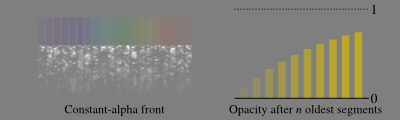
This leaves condition (3) -- no hard edges. This is solved by drawing the blow slowly instead of all at once. Specifically, every time a front moves, it draws over its last 10 positions with partially-transparent segments. This has the effect of slowly building up the bow color over 10 steps:

Unfortunately, because it draws over each of the old positions with the same opacity (alpha value) -- set, in an ad-hoc way to 1/8th -- the effective opacity of the bow is only about 73%.

The New Solution

Let me start by considering a simpler version where we only draw over the last 4 locations. Labeling the segments that get drawn as 1-4 and the locations traversed a-g (both from oldest to newest), one can sketch this diagram:


  ...               ...
frame 4:         1 2 3 4
frame 3:       1 2 3 4
frame 2:     1 2 3 4
frame 1:   1 2 3 4
          ---------------
location:  a b c d e f g

I.e. location a will be drawn into by segment 1, and then no others; location b gets drawn by 2 then 1, location c by 3 then 2 then 1, and so on.

So what opacity value should we pick for segment 4 if we want locations d and beyond to have opacity αtarget? Well, it depends what the next passes (1-3) will draw over it. Let's say that segments 1-3, when drawn, will cover fraction αnext of a pixel. Then we can select opacity value x for segment 4 by writing down the blending equation:

αtarget = αnext + (1 - αnext)x

αtarget - αnext = (1 - αnext)x

x = (αtarget - αnext)/(1 - αnext)

This passes some basic sanity checks -- if we want 100% coverage after segments (1-3) are drawn (i.e. αtarget = 1), we need to draw segment 4 with 100% opacity (i.e. x = 1). Also, if αnext is greater than αtarget then we get negative values -- which makes sense, as segment 4 can't prevent the subsequently drawn segments from covering the location, so it needs to attempt to preemptively remove coverage.

Implementation

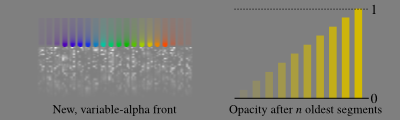
Since I'd like the rainbow to smoothly fade in from a cleared start, I chose a "fade" opacity value, f to vary smoothly from 0% coverage (at the trailing edge of the oldest segment) to 100% (at the leading edge of the newest).

In the pixel shader, other factors that influence opacity -- band color, edge-of-band "antialiasing" texture -- are looked up. Letting their product be called m, the shader sets:

αtarget = f * m

αnext = min(1.0, f + 1/10) * m

These values are used to compute the final opacity value x as outlined above. This results in a variable-opacity front that produces a more vibrant bow:

Next Steps

I was a bit worried about having a divide in the pixel shader, but profiling on iOS shows negligible effect on frame time.

Since all of this math is actually done on 8-bit color values, some inaccuracy (and banding) does result. I could avoid this (and the above-mentioned divide) by doing the computation of x with a look-up-table that takes these errors into account. However, the artifacts are not so severe that this is a high priority.

Some Methods That Didn't Work

Before settling on the present solution, I tried all sorts of other ideas including multi-pass rendering and different blending modes. While none of them were what I wanted, they did produce some interesting pictures.

Monday, August 12, 2013

Rktcr's Mineral Pipeline

In Rktcr, your goal is to come up with a path that collects fourteen gems (at least for teams with large-size worlds; smaller worlds have fewer). Until recently, these gems had clever names (and mineral associations), but all drew the same in game. Since gem styles was an item on my release to do list, I spent some time over the last two days making each gem unique.

In this post, I'll talk about how I made these gems. The content pipeline isn't very long (blender + a python script), but it certainly served its purpose adequately.

It's also worth saying up front that I included in Rktcr several minerals not cut into gemstones. Dialog still refers to these as gems. The pedantic among you may abhor this.

Modeling: Blender

All the gems in Rktcr start in Blender -- a 3D modelling program I've been using for a long time. One of the great things about Blender is the integrated python scripting. The following script scrapes all objects named "Gem:*" out of a .blend file and deposits triangle lists into Rktcr's distribution directory:

#!/usr/bin/env python

import bpy
import struct
import math

for obj in bpy.data.objects:
    if obj.name[0:4] != 'Gem:':
        continue
    gem = obj.name[4:]
    print('Doing ' + gem)
    blob = open('../dist/gems/' + gem + '.blob', 'wb')

    mesh = obj.data
    count = 0
    for poly in mesh.polygons:
        count += (len(poly.vertices) - 2) * 3
 
    for poly in mesh.polygons:
        norm = poly.normal
        a = []
        a_norm = []
        b = []
        b_norm = []
        for vi in poly.vertices:
            vert = mesh.vertices[vi].co * 0.1
            if poly.use_smooth:
                norm = mesh.vertices[vi].normal
            if len(a) == 0:
                a = vert
                a_norm = norm
            else:
                if len(b) != 0:
                    blob.write(struct.pack('fff',*a_norm))
                    blob.write(struct.pack('fff',*a))
                    blob.write(struct.pack('fff',*b_norm))
                    blob.write(struct.pack('fff',*b))
                    blob.write(struct.pack('fff',*norm))
                    blob.write(struct.pack('fff',*vert))
                    b = vert
                    b_norm = norm
        blob.close()
quit()

Loading

Why write out binary blobs instead of (say) using .obj export? One big reason is simplicity. This is the code I use to import the models:

Vector3f vert, norm;
while (
    file->read(reinterpret_cast< char * >(&norm), sizeof(norm)) && 
    file->read(reinterpret_cast< char * >(&vert), sizeof(vert))) {
    verts.push_back(vert);
    norms.push_back(norm);
}

Of course, it would be even simpler to slurp the file directly into (GPU?) memory, but I decided to defer that because it would require monkeying a bit with Rktcr's file handling layer.

Rendering

Minerals rendered as diffuse-only shaded models would be pretty boring. After casting about for a one-size-fits-all rendering approach, and being unsatisfied with everything I could come up with, I ended up crafting seven different display styles.

Diffuse

Even though diffuse rendering is rather boring, it is used in-engine for rendering "ghost" gems -- gems the player has already picked up on this path.

Clear

Clear gems are rendered in two layers -- a back shell and a front shell. Both shells are rendered using a base color and an additional highlight looked up from a lighting texture using a pseudo-reflection vector. Lighting on the back shell is tinted to the gem color, while lighting on the front shell is simply added.

Metallic

Metallic gems use one layer rendered with a Phong material. For being such a simple shading model, it works quite well (especially when coupled with the right geometry).

Dusty Metallic

The dusty metallic model is metallic with a "dust" texture used to modulate the specular power and alter the diffuse color. I found that using Blender's rendering of the gem with only ambient occlusion was a good starting point for dust textures.

Refractive

The refractive style is used for a few different minerals that occur in not-so-pristine crystals. It renders the gem with a dust texture (like "dusty metallic") and highlights from texture-based vertex lighting (like the "clear" style). Additionally, the inside of the gem is rendered by looking up in an "inside" texture using a pseudo-refraction vector.

Unfortunately, for all its sophistication, I'm not very happy with the outputs of this style just yet. It can be very tricky balancing the dust, lighting, and refraction effects to achieve a nice look.

Tourmaline

The "tourmaline" style started out as a single-purpose rendering engine for -- you guessed it -- tourmaline; however, I ended up using it for one other mineral as well.

This style renders in a single pass, generating front and back reflections using two different psuedo-reflection vectors. Like a "clear"-style gem, the front reflection is added and the back reflection is modulated. However, unlike a "clear"-style gem, the tint color is set using a texture.

Opal

The opal gets its own rendering engine to deal with the milky outer shell and the reflective inner fire. The gem is drawn in three passes -- the shell is drawn with low opacity, the fire, then the shell again.

The fire is made to shimmers by using a pseudo-reflection vector to look up vertex colors in a texture.

The shell uses a modified diffuse lighting model to fake subsurface scattering.

The Finished Minerals

Above, you see all fourteen gems (plus the goal gem for challenge levels and a placeholder gem used in the editor) rendered by the game; I'm not entirely happy with all of them yet (e.g. obsidian probably needs a second light to have good contrast with the background). However, this is probably quite close to the set of gems that I'll be shipping August 21st.