1. icon for News
  2. icon for TCHOW

News

Showing posts with label rainbow. Show all posts

Saturday, February 21, 2015

Rainbow is a Pocket Gamer 2015 Nominee

My rainbow-driving game, Rainbow (available for iOS and Android for approximately $1) has been nominated for a Pocket Gamer award in the "Most Innovative" category.

Please head over to Pocket Gamer to vote. It's almost certainly not going to win, but one must try, eh?

Thursday, January 1, 2015

Why Rainbow fails on iOS 8

Last week, I received a disturbing bug report from an iOS 8 user: Rainbow, it seems, wasn't properly saving any game state. So, I sat down to see what the problem was.

The culprit seems to be the helper function user_data_dir, which is responsible for figuring out where to store data files for the game:

string user_data_dir(string const &app_name)
    /* ... */
    #elif defined(IOS)
    ret = "../Documents";
    #elif defined(ANDROID)
    /* ... */
    return ret;
}

Hmm. A hardcoded path. That seems brittle.

Looking up user data paths and iOS 8, I came across a tech note which pretty succinctly explained the situation. Basically, the Documents directory is no longer a sibling of the application, so must be requested using a (ObjC) call, which I ended up dumping into a different (compiled-as-ObjC++) file:

std::string documents_directory() {
    return [[[[[NSFileManager defaultManager] URLsForDirectory:NSDocumentDirectory inDomains:NSUserDomainMask] lastObject] path] UTF8String];
}

And that seems to have done it. Expect a 1.5.2 version of Rainbow to appear soon.

Thursday, February 6, 2014

Seven Skills of Highly Effective Rainbow Players

It has been a long time in coming, but I finally created a promotional video for Rainbow. Promotional and educational, I should say.

Take a gander:

Tuesday, January 14, 2014

Iterating on Promo Art for Rainbow

Rainbow for iOS (and for Android!) will be out tomorrow, and as part of the assets for the Google Play store, I needed to design a large (1024x500) promotional image for the game.

As you can see above, I arrived at an pretty good image. I think it captures the essence of Rainbow's art style and gameplay, while striking a balance between cleanliness and boredom.

Arriving at this image required a few iterations. My first mockups had a hand-drawn rainbow that just didn't seem lively enough:

I tried patching in some spirals, but they still didn't look right to me. Perhaps this is because I'm over-familiar with the way cubic splines look (and/or the way rainbows actually move in the game):

So I ended up hacking in a special game mode that uses a white background and hides the level while taking screenshots; and repeatedly played through a simple (splitter-only) level to come up with some rainbow patterns. This turns out to be somewhat difficult.

This was good as a first cut, but too busy. After trimming a few of the characters from the bottom of the image, and playing through my empty level several more times, I arrived at the final version:

I also needed a smaller version of the image with a slightly different aspect ratio (180x120). For this I re-arranged the TCHOW logo to above the word "Rainbow" and strengthened the halo to make the letters more readable:

The final promo and small promo images -- along with high-res versions of other game assets -- can be obtained from the Rainbow Press Kit.

Friday, January 10, 2014

Rainbow for iOS out on January 15th

It's been a while, but Rainbow is finally ready to go on sale in the iOS App store. The game will be out on the 15th of this month, and will sell for $2.

More information about Rainbow can be found on the game's web page and press kit.

Wednesday, November 6, 2013

Rainbow Update: More Music

I am pleased to report that the iOS version of Rainbow is proceeding well. In fact, a 1.0 version has already been accepted for app store sale (though -- owning to some gameplay changes -- I will probably not release it).

So, what have I been working on? Well, other than finding a real job, tweaking and adjusting Rainbow to be an even better game. Part of that is doing things like adding incidental music to cutscenes -- and that's what this post is about.

The Music

The most recent two tracks I added to Rainbow were an opening and closing theme for the villain (and player's persona), who I will simply call "D.D." herein.

The opening theme is meant to be sinister but energetic, as befits a villain whose goal is to bring color and happiness into the lives of a drab people:

The closing theme is meant to be similar to the opening theme but more mellow, because D.D. is now tired from the effort of playing through the game:

One of the things that I think works really well in both of these tracks is the drums. The main drums are from Reason's factory sound library, but are bit-crushed via a Scream4's "digital" method:

I also automate the 'Rate' parameter of the Scream4 in one of the tracks to get some interesting variation into the drums. It's certainly a rough sound, but it's one that I quite enjoyed using in an earlier track.

The parallel channel through the reverb and compressor is generally mixed very low, but it does provide some interesting texture. (The LFO is being used to sweep the resolution on the Scream4 in this channel, which adds more rhythm to the texture.)

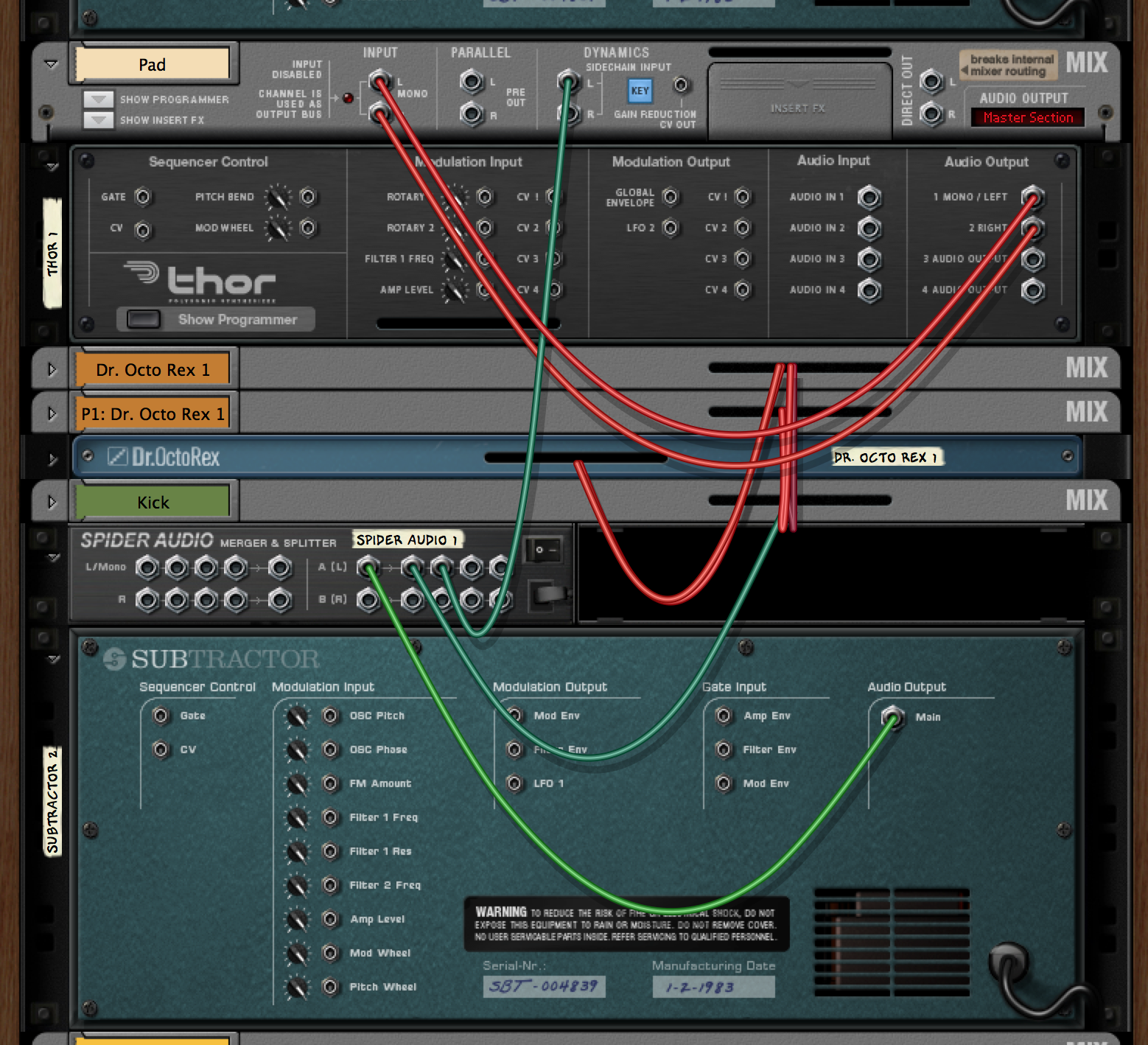
In addition to the main drums, I use a lone synth kick, without any fancy effects, in parts of the track. This kick is used as an sidechain input on the lower pad, in order to make the pad duck the kick (and thus make the kick seem to hit harder):

I doubt Rainbow will be winning any awards for cutscene music design, but these snippets certainly seem better than letting the menu theme continue to play.

Sunday, September 15, 2013

Brighter 'Bows

The HTML5 version of Rainbow features vibrantly colored Rainbows; when porting to C++, I traded off a bit of the brightness of the rainbows for softer intersection behavior. This weekend, I set out to brighten the bows in the C++ port, while retaining nice bow intersections.

html5: bright bows

old C++: dull bows

new C++: bright bows

As you can see, the C++ version has been improved to have bows as bright as the HTML5 version.

The Goal

In Rainbow, the player can split the rainbow they control into multiple "fronts" and drive these fronts separately. Each front leaves a rainbow trail.

I would like several conditions to hold:

  1. Trails freshly produced by a front should draw over older trails.
  2. Fronts should always remain visible.
  3. No hard edges should be introduced.

To justify briefly: (1) arises because I want players to see what they are currently controlling; (2) is important because players should be able to see how much rainbow they have left; and (3) just seems like how magical rainbow substance should behave.

The Old Solutions

HTML5

In the HTML5 version of Rainbow, the entire rainbow is redrawn each frame with each vertex's depth set based on the number of ticks from the beginning of the rainbow. This method actually fails all three of my ideal conditions in some cases, e.g. when drawing with an older front.

C++

In the C++ port, the rainbow is accumulated into a framebuffer. This pretty much guarantees that condition (1) holds. Condition (2) is satisfied by always drawing (but not accumulating) the very front of the bow over the top of everything in a different rendering pass.

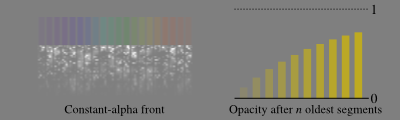
This leaves condition (3) -- no hard edges. This is solved by drawing the blow slowly instead of all at once. Specifically, every time a front moves, it draws over its last 10 positions with partially-transparent segments. This has the effect of slowly building up the bow color over 10 steps:

Unfortunately, because it draws over each of the old positions with the same opacity (alpha value) -- set, in an ad-hoc way to 1/8th -- the effective opacity of the bow is only about 73%.

The New Solution

Let me start by considering a simpler version where we only draw over the last 4 locations. Labeling the segments that get drawn as 1-4 and the locations traversed a-g (both from oldest to newest), one can sketch this diagram:


  ...               ...
frame 4:         1 2 3 4
frame 3:       1 2 3 4
frame 2:     1 2 3 4
frame 1:   1 2 3 4
          ---------------
location:  a b c d e f g

I.e. location a will be drawn into by segment 1, and then no others; location b gets drawn by 2 then 1, location c by 3 then 2 then 1, and so on.

So what opacity value should we pick for segment 4 if we want locations d and beyond to have opacity αtarget? Well, it depends what the next passes (1-3) will draw over it. Let's say that segments 1-3, when drawn, will cover fraction αnext of a pixel. Then we can select opacity value x for segment 4 by writing down the blending equation:

αtarget = αnext + (1 - αnext)x

αtarget - αnext = (1 - αnext)x

x = (αtarget - αnext)/(1 - αnext)

This passes some basic sanity checks -- if we want 100% coverage after segments (1-3) are drawn (i.e. αtarget = 1), we need to draw segment 4 with 100% opacity (i.e. x = 1). Also, if αnext is greater than αtarget then we get negative values -- which makes sense, as segment 4 can't prevent the subsequently drawn segments from covering the location, so it needs to attempt to preemptively remove coverage.

Implementation

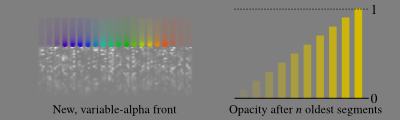
Since I'd like the rainbow to smoothly fade in from a cleared start, I chose a "fade" opacity value, f to vary smoothly from 0% coverage (at the trailing edge of the oldest segment) to 100% (at the leading edge of the newest).

In the pixel shader, other factors that influence opacity -- band color, edge-of-band "antialiasing" texture -- are looked up. Letting their product be called m, the shader sets:

αtarget = f * m

αnext = min(1.0, f + 1/10) * m

These values are used to compute the final opacity value x as outlined above. This results in a variable-opacity front that produces a more vibrant bow:

Next Steps

I was a bit worried about having a divide in the pixel shader, but profiling on iOS shows negligible effect on frame time.

Since all of this math is actually done on 8-bit color values, some inaccuracy (and banding) does result. I could avoid this (and the above-mentioned divide) by doing the computation of x with a look-up-table that takes these errors into account. However, the artifacts are not so severe that this is a high priority.

Some Methods That Didn't Work

Before settling on the present solution, I tried all sorts of other ideas including multi-pass rendering and different blending modes. While none of them were what I wanted, they did produce some interesting pictures.

Tuesday, July 9, 2013

Collision in Rainbow

One of the things I'm revisiting in the C++ port of Rainbow is the way in which the bow fronts collide with level geometry, and how this splits up the fronts.

Splitting fronts is an important part of the game because smaller fronts are more maneuverable. However, in the HTML5 version of rainbow, the only way to split a front was to run it into something in a way that stopped one of the frequency bands. In the C++ port, I wanted to make it so that (with certain level geometry) one could actually split a front nondestructively.

The key to this is to use ray-vs-level tests to determine bow collision and convex-vs-level tests to figure out where to split the front. This way, frequency bands only crash if their centers intersect level geometry, but bow fronts can split gracefully around thin geometry. I finally added convex-convex collision today, so this splitting system is up and running.

Thursday, June 20, 2013

Rainbow Screenshots

Here are a few screenshots of Rainbow on iPhone. Now that I have future visualization (sparkles) added, the game is quite playable. (I had no trouble getting through the original levels with touch controls on the small iPhone screen.)

Thursday, June 6, 2013

Rainbow Tileset Improvements

Today, I spent some time on improving Rainbow's tileset. Here's what it looks like now:

Thursday, May 23, 2013

Enlightening Work

After a slow day and a half, the C++ port of Rainbow now has enlightenment working.

The next thing to do is probably to revisit how control works, and build effects to reflect the current state of each frequency band (unclaimed, claiming, following, crashed). These will be different than the mouse-control effects, because with touches one does not know where an inactive control point lies.

Tuesday, May 21, 2013

Utilitarian Level Select

Today, I completed the last pieces of the editing levels puzzle for my C++ port of Rainbow.

The first of these was level loading and saving (which doesn't really have a screenshot representation). The second was level selection:

This is a utilitarian screen designed for use when editing levels. Tapping any level edits it, tapping a '+' spot edits a new blank level.

One final thing I might add add to the editor is some sort of zoom capability (or I could forgo editing large levels on iPhone). The downside of this is it might encourage the creation of levels with detail too small to play on one screen; and I'd rather avoid having to have zoom during play, given that the rainbow's trail is accumulated into a framebuffer.

Monday, May 20, 2013

A More Finished Editor

Today, I continued work on the level editor component of my C++ port of Rainbow. While it isn't as pretty as it could be, it now is entirely functional, and ready to build levels with.

Here's what a little test level looks like in the editor and in the game. Note that the grey box in the lower right of the game view is a button that brings up a "restart/quit" menu -- useful to have so you can get back to the editor.

All that remains is to get peon placement and load/save looped in, and then I should be able to realize my goal of being able to build Rainbow levels "on the go". (Hmm, I wonder how I can get the files back off my phone? I should make sure there's a section for that in the XCode organizer. I think there is.)

Rainbow's Mobile Editor

I've been working on a C++/OpenGL port of Rainbow for a number of reasons. The first is that I like Rainbow, and I thought it might be fun to play on iOS. The second is that there were things I wanted to add to the gameplay that would have complicated the javascript code terribly. The third is that I'd like to be able to be productive on my iPhone.

This is the beginnings of a level editor for Rainbow, running on my iPhone.

I really don't do tile-based games very often, and when I do, the levels are often specified in ASCII. (Indeed, this is what the javascript version of rainbow uses, as you can see.) So this is my first time writing a tile grid editor. So far, it seems to feel pretty good.

Saturday, May 18, 2013

Another Rainbow Drawing Interation

Last night, after some profiling under iOS, it became clear that the method of drawing rainbows that I discussed in my previous post was going to be too heavy. Basically, the nice curve-y geometry of Rainbow's rainbows just contain too many vertices for my iPhone4 to want to render every frame at 60fps.

So, this morning, I revised the drawing code again, this time to accumulate into a framebuffer. This means that the actual amount of bow geometry rendered each frame is quite small, in exchange for the (large) fixed overhead of a full-screen blend. As an added bonus, when two active fronts overlap, the resulting bow is nicely blended (something that no other method I've come up with can achieve).

Unfortunately, this method limits (somewhat) the kind of graphical effects the game can perform. E.g., it can't fade out an entire band that hits a wall, or animate bands along their length. Rather, it could do these things, but I'd have to change the drawing method again, and sacrifice transparent bands and smooth mixing, or pay for another full-screen blend which -- it seems like -- the game can't really afford.

Friday, May 17, 2013

Stylish [Rain]bows

Today's hacking on Rainbow proceeded under Linux with OpenGL3 for output. I've built a helper class that should (fingers crossed) mean that everything transitions cleanly to OpenGL ES (at least as far as streaming vertex attributes).

Today, I worked on making the rainbow draw more nicely. The first step was to start using a special purpose shader.

The shader takes the position of each vertex and three info values -- the index of the frequency band, the position within the frequency band (shown above), and an alpha value which modulates the band's transparency.

A 1D profile texture (with mipmap) provides "fake" antialiasing, while a 1D color texture tints each band.

The above screenshot also shows off, to some extent, decent bow overlapping. In the Javascript version of Rainbow, overlapping is depth-buffer based (basically, bands are ordered based on the amount of time they've been controlled). This wasn't really satisfying, because it could result in hard edges where band orders switched.

This shows my first attempt at resolving the overlap problem by adding smooth fades. Unfortunately, without some sort of matching fade out, there are slight edges induced (especially in the infrared and ultraviolet). Solving this is going to involve slinging a fair number more dynamic vertices around, so I'm going to jump back to iPhone and see how my performance is faring before getting too far into things.

Thursday, May 16, 2013

Rainbow Port Progress: Steering

Today, I continued working on my port of Rainbow from Javascript/WebGL to C++/OpenGL. I got steering in, and tested out collision detection -- [nearly] working first time.

As you can see in the screenshot above, I haven't yet turned on depth testing (to make the stripes render in the proper stacking order). Also, if you are an astute counter of pixels, you will notice that this shot is exactly the size of an iPhone4 display.

Yep, instead of graphical effects, I decided to find out how similar the OpenGL 3.2 and OpenGL ES 2.0 APIs were, and got an iPhone compile working. Turns out: really really similar; though the GLSL flavors are unfortunately somewhat different. Also, using GL_STREAM_DRAW vertex buffer objects instead of just pointing to data in memory seems to be a bad idea on iOS (versus the only game in town in GL3).

So it looks like my mobile version is going to probably have some unfortunate #ifdef magic in place in the graphics code. On the other hand, steering (multiple) rainbow fronts around with multiple fingers is already working (and fun!), and there's a fair amount of room on an iPhone screen to do it in.

Wednesday, May 15, 2013

Porting Rainbow

Today, I took some time away from fiddling with Rktcr's path select mode to work on the OpenGL/C++ port of my WebGL/Javascript game Rainbow. I'm using this port as an opportunity to re-write a lot of my basic infrastructure code, and to add some features to the game.

After one afternoon of work, I have basic drawing working nicely. I'm hoping that tomorrow I can get gameplay going again, test the collision detection routines I wrote today, and maybe even start playing with some of my graphics enhancement ideas.

It would be odd, though not entirely unexpected, if it turns out that the C++ port takes longer than the original javascript version to write.

Thursday, January 10, 2013

Rainbow - Post-Mortem (Part 3)

These posts tell the story of rainbow, my LD25 entry. In part 1 and part 2, I talked about ideation and the initial push to a working prototype. In this part I will talk about the refinements and polish I added to reach the finished version.

Sunday Morning: Sound

My Saturday prototype didn't have any sound, so I started out Sunday fooling around in Reason.

I decided to make the background music from a pair of loops (a dull "background" loop and a sparkly "rainbow" loop), which would be mixed according to level state. This seemed like a good option for getting some variability out of the music without having large downloads or making long tracks.

I additionally built some chords for when peons are enlightened, and a little arpeggio for when the rainbow starts.

Note: I took this screenshot on my mac laptop; however, I actually did the music stuff under Windows. This also meant that I had the chance to find a few OS-dependent bugs (most of the dev work was done under Linux).

To get the sounds into the game, I exported various tracks from Reason (selectively muting), then loaded them into Audacity where I trimmed and exported to ogg.

This is much the same workflow as I use for sound in rktcr. It's not very automated, which I think is something of a problem; but it certainly isn't one that I was going to solve during a time-limited game compo.

By noon, I'd added the last (crucial!) sound feature, muting:

I could have just turned off my speakers, but that would have interfered with listening to spotify in the background.

Sunday Afternoon: Polish

Going into the afternoon, I knew I had something that resembled a game, but there were many things that could be improved. I was pretty sure I wouldn't get to all of them, so I made a list and prioritized.

The first thing I added were peon textures. These tied the in-game experience to the intro and outro screens:

As you may notice, my first pass didn't actually change the peons' expressions, just their color. The fading turned out to be easy to add (~10 minutes more work), so I got that in next.

From there, I turned to the rainbow ends. I knew there needed to be some way to tell apart "live" rainbow (that could grow further) and "dead" rainbow (that had -- say -- enlightened a peon). My first attempt was to add fade-outs:

These turned out to be a bit too subtle, as you can see.

So I added sparkles:

I like these because they are higher-contrast than the fade-outs, they clearly indicate where the end of the bow is, and their motion makes them very easy to spot.

At this point, it was around 13:40 in the afternoon. There was a potluck I wanted to go to which started at 5pm; and I was treating this as my unofficial (early) deadline. So I didn't want to start any big changes on the game.

Unfortunately, I still wasn't quite satisfied with the way small rainbows controlled, and this was going to require a rather large chunk of refactoring to fix. Fortunately, the refactoring went better than I'd hoped and I had smoother small-bow control by 15:00.

As a bonus, the refactored control made it easy to draw sparkles that actually showed were controlled rainbows would be going:

This brought me to around 15:20, with the main game basically finished. Since I still had a chunk of time before the potluck, I added some animation (jumping/tipping peons) to the intro and outro screens, and drew additional title cards for these scenes.

At 16:30, I noticed things were no longer working in Firefox and had a 15-minute bug-hunt-scramble. I got the code up on my web page, figured out how to submit, and made it to the potluck by 17:30 or so. (Other times in these posts came from commit messages, the potluck arrival I just have to guess at.)

Final Thoughts

I think I did a good job on this project of picking something with a small scope, and getting it into a working state quickly. I also think I made the right choice by avoiding javascript frameworks and instead working directly with the default HTML5 APIs. This probably cost me some cross-browser compatibility, but it also saved a lot of reading documentation and fixing other people's bugs.

There were some ideas -- e.g. an overworld map to show level progress, color filters, mirrors -- that I could have added given more time. Specifically, the lack of an overworld makes it hard to know how long the game is, which is the biggest problem with the final version. There are also smaller things -- like optimizing the rainbow drawing -- which I would like to have done for perfectionism's sake, but weren't really required to make things work.

During development, I worried that the game was too easy. I had one of my neighbors play the first prototype, and they confirmed my suspicions. The player can see exactly where the rainbow will go, and there is no time pressure in planning its path. I wanted to fix this by having the rainbow constantly grow, but never got around to it. I guess I'm sort of glad that I didn't, as many of the comments on the contest page for the game talk about how hard it is.

Of course, these comments are wrong.

As a procedural note, I'm glad I sat down and rated a bunch of games (my brother helped by sitting with me and offering second opinions). Not only were there some real gems in there, it also meant that rainbow got rated a bunch of times. It's great to get feedback from so many people, and I'm flattered that folks found the game innovative.

Moving Forward

I find that I like this mechanic, and would enjoy producing an extended version of the game. However, my priority at the moment is rktcr.

Wednesday, January 9, 2013

Rainbow - Post-Mortem (Part 2)

In this series of posts, I talk about the process behind Rainbow, my LD25 game.

In part one, I described my failure to come up with a good idea while feeling sad. I resume the story on...

Saturday Morning: An idea

I woke up Satuday morning (probably around 10am -- lots of sleep is important for creativity) and decided that being sad was hard to do and wasn't getting me anywhere. So I sat down to do some more sketches.

I started with the anti-thief idea from Friday, which got me thinking about visibility rays. In turn, this led to thinking about light versus shadow, and I drew some pictures of houses with light streaming in through the windows. Of course, light that goes straight didn't seem to have much play-ability, so I started thinking about steerable light.

Which led me to the idea of steerable rainbows. This struck me as a good concept because rainbows aren't sad, and because thinner rainbows might steer differently than thicker ones. I also had some ideas for different mechanics like splitting rainbows, color filters, and color-limited targets.

Saturday Afternoon: Coding

With my idea in hand, I set out to build it in HTML5 using the canvas' 2D drawing API. My only previous experience in HTML5 was the tchow solstice card, and a few hacks for a (not yet published) study. (I generally work in C++ / OpenGL.)

Anyway, I sat down with an empty .js file and a pile of tutorials and started hacking together something I thought might work. By about 13:40 I had a really basic prototype in place, which was able to draw a level and a bit of rainbow that followed the mouse cursor's horizontal position:

This was good as far as showing that I was going to be able to work in HTML5, but it didn't get at the core of the game (steering the rainbow). By around 15:00 I had added steering behavior, though hadn't done collision yet:

I kept working on the steering mechanic, trying to get the rainbow to feel stately enough without being trivial. By 15:40 I had collisions and rainbow splitting:

It was becoming obvious, though, that the way the rainbow was being drawn (as one path for each color) wasn't correct -- it meant that certain colors were always on top, rather than fresher parts of the rainbow being on top. This wasn't going to cut it, graphically, so I started the process of going from 2D canvas drawing primitives to WebGL triangle drawing.

By 20:20 I had this working:

The jaggies are present because I turned off antialiasing to make it easier to spot bugs in the drawing. I ended up having to write my own thick-line-drawing because glLineWidth didn't do nice joins at corners.

With the evening growing late, I decided to push a bit more and wrap the game up in an intro and outro to explain the plot, and make levels winnable.

After toiling in inkscape to produce some pictures, and then figuring out how texture loading works in HTML5 (neat hack: if you don't want to deal with local file access permissions stuff, you can just base64-encode your textures into data urls), I had something looking relatively finished:

You'll notice that the peons have not yet been skinned (texture loading was used only for the intro and outro screens at this point). Also, at some point in this work, I added feature which allowed me to jump to any level by putting its index in the query string. This was useful for testing (and remains in the final version of the game).

At this point I had something that was winnable and had a beginning and end; and it was getting late (1:40), so I headed to bed.

However, the game was far from complete. The steering of thin rainbows was a bit glitchy, I hadn't worked on sound at all, and there was no indicator for which rainbow would grow next (or where it would grow to). Also, more levels were needed.

Of course, this is a story for the next post.